Plan RAM, VRAM, and disk together
Keep separate budgets for storage, system memory, accelerator memory, and headroom.
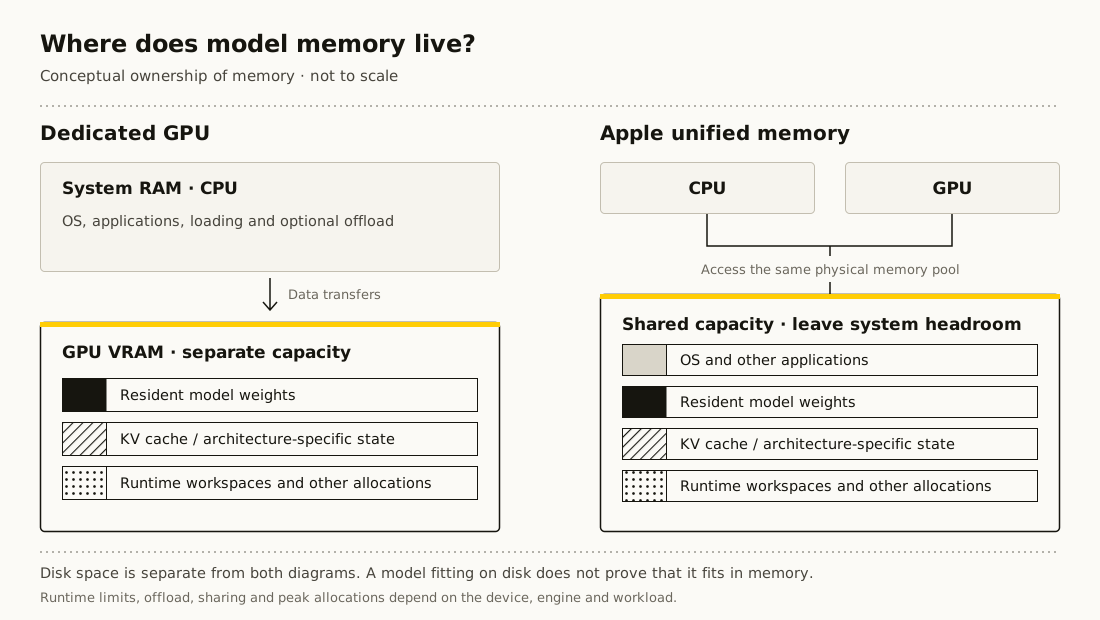
Three capacities, three different jobs
Disk stores downloaded files. System RAM holds application data and may hold offloaded model weights. Discrete GPU VRAM holds accelerator-resident weights, cache, and workspaces. Free disk space does not substitute for VRAM.
On Apple silicon, the CPU and GPU share unified memory. Do not count that memory twice. Leave room for macOS, the application, and other processes; the advertised total is not all available to a single model.
Compare the same units
A decimal GB is 1,000,000,000 bytes. A GiB is 1,073,741,824 bytes. sizeof.ai uses GiB for memory estimates. A download shown in GB may appear smaller when expressed in GiB without any file being missing.
Plan disk space for the selected artifacts, download staging, alternative quantizations, and runtime caches. Do not download every variant in a repository when you only need one complete model.
More GPUs do not make one invisible pool
Adding card capacities is only a first planning number. Your runtime must support the required split, individual layers or tensors must be placeable, and interconnect overhead can dominate.
Use existing hardware for a small representative test before buying or renting more. sizeof.ai estimates capacity, not guaranteed compatibility, generation speed, or purchase value.